UNION
The UNION operation combines the result sets of two or more SELECT statements. It returns a result set that contains all the unique rows from the combined sets.
The syntax to use UNION on the table is:
SELECT column_name(s) FROM table1
UNION
SELECT column_name(s) FROM table2;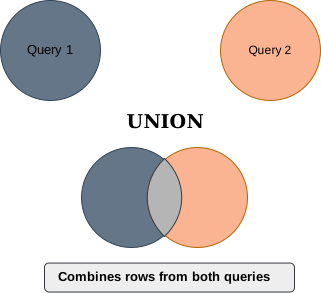 Image scaled to 50%
Example
Suppose we have two database tables with the names Customers and Suppliers as shown below
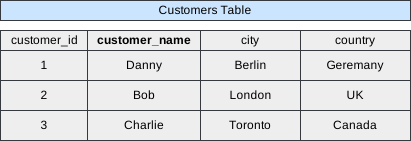 Image scaled to 70%
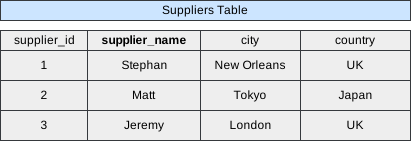 Image scaled to 70%
Now, we want to fetch the cities from the Customers and Suppliers tables. The query will go like this.
Database Exercise
Database Schema:
-- Database schema would be rendered hereExercise Script:
-- Exercise script would be rendered hereAvailable actions: Execute
And it will show the following result
 Image scaled to 60%
You may have noticed that even if duplicate cities exist, UNION listed each city only once because it selects distinct values.
UNION ALL
UNION ALL is similar to UNION but includes all rows from the combined sets, including duplicates.
The syntax to use UNION ALL is:
SELECT column_name(s) FROM table1
UNION ALL
SELECT column_name(s) FROM table2;
Using UNION ALL to query the same Customers and Suppliers table will provide the following results.
Database Exercise
Database Schema:
-- Database schema would be rendered hereExercise Script:
-- Exercise script would be rendered hereAvailable actions: Execute
Image scaled to 60%