Problem
Table: Ads
+---------------+---------+
| Column Name   | Type    |
+---------------+---------+
| ad_id         | int     |
| user_id       | int     |
| action        | enum    |
+---------------+---------+
(ad_id, user_id) is the primary key (combination of columns with unique values) for this table.
Each row of this table contains the ID of an Ad, the ID of a user, and the action taken by this user regarding this Ad.
The action column is an ENUM (category) type of ('Clicked', 'Viewed', 'Ignored').
Problem Definition
A company is running Ads and wants to calculate the performance of each Ad.
Performance of the Ad is measured using Click-Through Rate (CTR) where:
ctr = 0 if Ad total clicks + Ad total views = 0
else ctr = (Ad total clicks x 100) / (Ad total clicks + Ad total views)
Write a solution to find the ctr of each Ad. Round ctr to two decimal points.
Return the result table ordered by ctr in descending order and by ad_id in ascending order in case of a tie.
Example
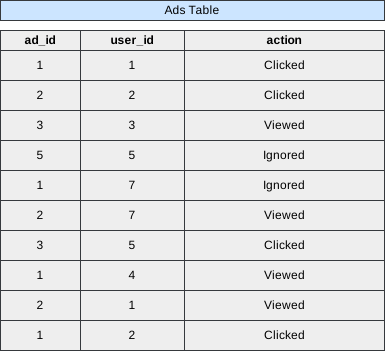 Image scaled to 60%
Output
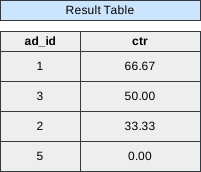 Image scaled to 40%
Try It Yourself
Database Exercise
Database Schema:
-- Database schema would be rendered hereExercise Script:
-- Exercise script would be rendered hereAvailable actions: Execute
Solution
To solve this problem, the approach involves using SQL queries to calculate the Click-Through Rate (CTR) for each Ad in the given Ads table. The CTR is defined as the ratio of the total number of clicks to the sum of the total number of clicks and views, expressed as a percentage. The formula for CTR is ctr = (Ad total clicks * 100) / (Ad total clicks + Ad total views).
To implement this in SQL, the SUM function is utilized to calculate the total number of clicks and views for each Ad. A CASE statement is used within the SUM function to distinguish between the ‘Clicked’ and ‘Viewed’ actions. The result is then rounded to two decimal points using the Round function.
The IFNULL function is employed to handle cases where the denominator in the CTR formula is zero, ensuring that the CTR is set to 0 in such instances.
The results are grouped by ad_id using the GROUP BY clause, and the final step involves ordering the result table by CTR in descending order and by ad_id in ascending order in case of a tie. This is achieved using the ORDER BY clause.
SELECT ad_id,
       Ifnull(Round(Sum(CASE
                          WHEN action = 'Clicked' THEN 1
                          ELSE 0
                        END) / Sum(CASE
                                     WHEN action = 'Clicked'
                                           OR action = 'Viewed' THEN 1
                                     ELSE 0
                                   END) * 100, 2), 0) AS ctr
FROM   Ads
GROUP  BY ad_id
ORDER  BY ctr DESC,
          ad_id ASC
Let’s break down the query into sub-steps:
Step 1: Calculate Clicks and Views for Each Ad
We use the CASE statement to count the number of ‘Clicked’ actions and the total number of ‘Clicked’ and ‘Viewed’ actions for each ad.
SELECT
    ad_id,
    SUM(CASE WHEN action = 'Clicked' THEN 1 ELSE 0 END) AS clicks,
    SUM(CASE WHEN action = 'Clicked' OR action = 'Viewed' THEN 1 ELSE 0 END) AS total_actions
FROM
    Ads
GROUP BY
    ad_id;
Output After Step 1:
+-------+-------+--------------+
| ad_id | clicks| total_actions|
+-------+-------+--------------+
| 1     | 2     | 3            |
| 2     | 1     | 3            |
| 3     | 1     | 2            |
| 5     | 0     | 0            |
+-------+-------+--------------+
Step 2: Calculate CTR for Each Ad
We use the results from Step 1 to calculate the Click-Through Rate (CTR) for each ad, rounding it to two decimal points. We also use IFNULL to handle cases where total_actions is zero.
SELECT
    ad_id,
    IFNULL(ROUND((clicks / total_actions) * 100, 2), 0) AS ctr
FROM (
    -- Sub-Step 1 output goes here
) AS subquery;
Output After Step 2:
+-------+-------+
| ad_id | ctr   |
+-------+-------+
| 1     | 66.67 |
| 2     | 33.33 |
| 3     | 50.00 |
| 5     | 0.00  |
+-------+-------+
Step 3: Order the Result
We order the result table by CTR in descending order and by ad_id in ascending order in case of a tie.
SELECT
    ad_id,
    ctr
FROM (
    -- Sub-Step 2 output goes here
) AS final_result
ORDER BY
    ctr DESC,
    ad_id ASC;
Final Output:
+-------+-------+
| ad_id | ctr   |
+-------+-------+
| 1     | 66.67 |
| 3     | 50.00 |
| 2     | 33.33 |
| 5     | 0.00  |
+-------+-------+
Note: Ignored ads are not considered in the calculation.