Problem
Table: Countries
+---------------+---------+
| Column Name   | Type    |
+---------------+---------+
| country_id    | int     |
| country_name  | varchar |
+---------------+---------+
country_id is the primary key (column with unique values) for this table.
Each row of this table contains the ID and the name of one country.
Table: Weather
+---------------+------+
| Column Name   | Type |
+---------------+------+
| country_id    | int  |
| weather_state | int  |
| day           | date |
+---------------+------+
(country_id, day) is the primary key (combination of columns with unique values) for this table.
Each row of this table indicates the weather state in a country for one day.
Problem Definition
Write a solution to find the type of weather in each country for November 2019.
The type of weather is:
- Cold if the average
weather_stateis less than or equal15, - Hot if the average
weather_stateis greater than or equal to25, and - Warm otherwise.
Return the result table.
Example
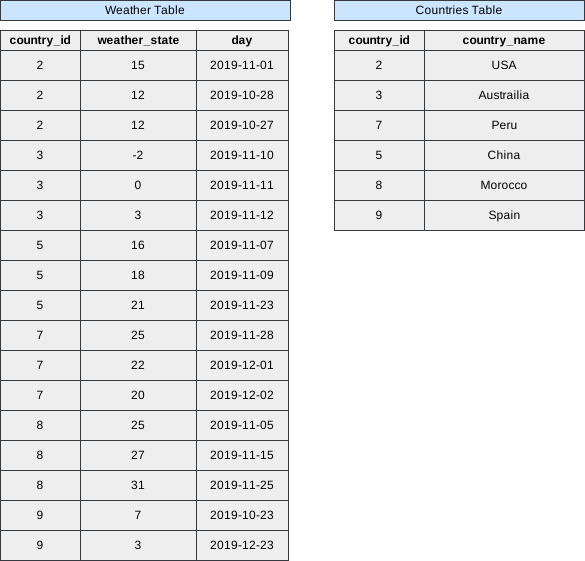 Image scaled to 80%
Output
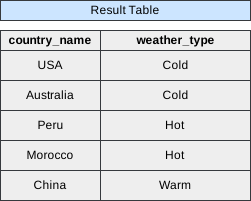 Image scaled to 40%
Try It Yourself
Database Exercise
Database Schema:
-- Database schema would be rendered hereExercise Script:
-- Exercise script would be rendered hereAvailable actions: Execute
Solution
To solve this problem, we need to determine the type of weather in each country for November 2019, based on the average weather_state values. The solution involves utilizing SQL queries to retrieve and process the necessary information from the given Countries and Weather tables.
Firstly, we employ the JOIN clause to combine data from both tables, linking them through the country_id column. This allows us to access the country names and their corresponding weather states. The JOIN operation is crucial for merging the relevant information from both tables into a single dataset.
Next, we utilize the AND operator in the ON clause to specify additional conditions for the join. Specifically, we filter the data to include only records from November 2019 by checking the year and month of the day column in the Weather table.
After joining and filtering the data, the GROUP BY clause is applied to group the results by country_name. This is essential for calculating the average weather_state for each country.
The AVG function is then used to compute the average weather state within each group, and the results are categorized into different weather types using the CASE statement. If the average weather_state is less than or equal to 15, the weather type is classified as ‘Cold’; if it is greater than or equal to 25, the type is ‘Hot’; otherwise, it is classified as ‘Warm’.
SELECT
    country_name,
    CASE
        WHEN AVG(weather_state) <= 15 THEN 'Cold'
        WHEN AVG(weather_state) >= 25 THEN 'Hot'
    ELSE 'Warm' END AS weather_type
FROM Countries
JOIN Weather ON Countries.country_id = Weather.country_id
AND YEAR(day) = '2019' AND MONTH(day) = '11'
GROUP BY country_name
Let’s break down the query step by step:
Step 1: Filter Data for November 2019
We start by filtering the data from the Weather table for November 2019.
SELECT *
FROM Weather
WHERE YEAR(day) = '2019' AND MONTH(day) = '11';
Output After Step 1:
+------------+---------------+------------+
| country_id | weather_state | day        |
+------------+---------------+------------+
| 2          | 15            | 2019-11-01 |
| 3          | -2            | 2019-11-10 |
| 3          | 0             | 2019-11-11 |
| 3          | 3             | 2019-11-12 |
| 5          | 16            | 2019-11-07 |
| 5          | 18            | 2019-11-09 |
| 5          | 21            | 2019-11-23 |
| 7          | 25            | 2019-11-28 |
| 8          | 25            | 2019-11-05 |
| 8          | 27            | 2019-11-15 |
| 8          | 31            | 2019-11-25 |
+------------+---------------+------------+
Step 2: Calculate Average Weather State
Next, we calculate the average weather_state for each country.
SELECT
    country_id,
    AVG(weather_state) AS avg_weather_state
FROM Step1
GROUP BY country_id;
Output After Step 2:
+------------+-------------------+
| country_id | avg_weather_state |
+------------+-------------------+
| 2          | 15                |
| 3          | 0.333             |
| 5          | 18.333            |
| 7          | 25                |
| 8          | 27.667            |
+------------+-------------------+
Step 3: Determine Weather Type
Now, we use a CASE statement to determine the weather type for each country based on the average weather_state.
SELECT
    country_id,
    CASE
        WHEN avg_weather_state <= 15 THEN 'Cold'
        WHEN avg_weather_state >= 25 THEN 'Hot'
        ELSE 'Warm'
    END AS weather_type
FROM Step2;
Output After Step 3:
+------------+--------------+
| country_id | weather_type |
+------------+--------------+
| 2          | Cold         |
| 3          | Cold         |
| 5          | Warm         |
| 7          | Hot          |
| 8          | Hot          |
+------------+--------------+
Step 4: Join with Countries Table
Finally, we join the result with the Countries table to get the country names.
SELECT
    c.country_name,
    w.weather_type
FROM Step3 w
JOIN Countries c ON w.country_id = c.country_id;
Final Output:
+--------------+--------------+
| country_name | weather_type |
+--------------+--------------+
| USA          | Cold         |
| Australia    | Cold         |
| China        | Warm         |
| Peru         | Hot          |
| Morocco      | Hot          |
+--------------+--------------+