Problem
Table: Sessions
+---------------+----------+
| Column Name   | Type     |
+---------------+----------+
| user_id       | int      |
| session_start | datetime |
| session_end   | datetime |
| session_id    | int      |
| session_type  | enum     |
+---------------+----------+
session_id is column of unique values for this table.
session_type is an ENUM (category) type of (Viewer, Streamer).
This table contains user id, session start, session end, session id and session type.
Problem Definition
Write a solution to find the number of streaming sessions for users whose first session was as a viewer.
Return the result table ordered by count of streaming sessions, user_id in descending order.
Example
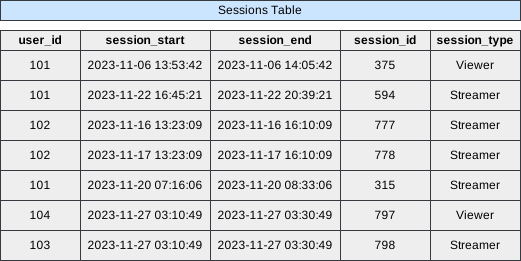 Image scaled to 80%
Output
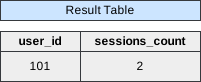 Image scaled to 35%
Try It Yourself
Database Exercise
Database Schema:
-- Database schema would be rendered hereExercise Script:
-- Exercise script would be rendered hereAvailable actions: Execute
Solution
To identify the number of streaming sessions for users whose first session was as a viewer, we analyze the Sessions table. We can efficiently accomplishes this by leveraging Common Table Expressions (CTEs), window functions, and conditional aggregations. Below is a comprehensive breakdown of the approach, step-by-step execution, and detailed explanations for each line of the SQL query.
Approach Overview
-
Determine the First Session of Each User:
- Use a window function to rank sessions based on the
session_starttime for each user. - Identify users whose first session (
rank = 1) was as a viewer.
- Use a window function to rank sessions based on the
-
Count Streaming Sessions for Qualified Users:
- For users identified in the first step, count the number of sessions where
session_typeis Streamer.
- For users identified in the first step, count the number of sessions where
-
Filter and Order the Results:
- Ensure that only users who have both Viewer and Streamer session types are considered.
- Order the final results by the count of streaming sessions in descending order and by
user_idin descending order in case of ties.
SQL Query
WITH cte AS (
    SELECT
        user_id,
        session_type,
        RANK() OVER (
            PARTITION BY user_id
            ORDER BY session_start
        ) AS rnk
    FROM Sessions
)
SELECT
    user_id,
    SUM(CASE WHEN session_type = 'Streamer' THEN 1 ELSE 0 END) AS sessions_count
FROM Sessions
WHERE user_id IN (
    SELECT user_id
    FROM cte
    WHERE rnk = 1 AND session_type = 'Viewer'
)
GROUP BY user_id
HAVING COUNT(DISTINCT session_type) = 2
ORDER BY sessions_count DESC, user_id DESC;
Step-by-Step Approach
Step 1: Determine the First Session of Each User (cte)
Identify the first session (rnk = 1) of each user to determine if it was a viewer session.
SQL Snippet:
WITH cte AS (
    SELECT
        user_id,
        session_type,
        RANK() OVER (
            PARTITION BY user_id
            ORDER BY session_start
        ) AS rnk
    FROM Sessions
)
Explanation:
-
WITH cte AS (- Initiates a Common Table Expression (CTE) named
cte. CTEs are temporary result sets that can be referenced within the main query.
- Initiates a Common Table Expression (CTE) named
-
SELECT user_id, session_type,- Selects the
user_idandsession_typecolumns from theSessionstable.
- Selects the
-
RANK() OVER (- Applies the
RANK()window function to assign a rank to each session based on thesession_starttime.
- Applies the
-
PARTITION BY user_id- Divides the data into partitions for each
user_id. The ranking will reset for each user.
- Divides the data into partitions for each
-
ORDER BY session_start- Orders the sessions within each partition by the
session_startdatetime in ascending order. The earliest session gets the highest priority.
- Orders the sessions within each partition by the
Intermediate Output After Step 1 (cte):
+---------+--------------+-----+
| user_id | session_type | rnk |
+---------+--------------+-----+
| 101     | Viewer       | 1   |
| 101     | Streamer     | 2   |
| 101     | Streamer     | 3   |
| 101     | Streamer     | 4   |
| 102     | Lose         | 1   |
| 102     | Lose         | 2   |
| 103     | Streamer     | 1   |
| 104     | Viewer       | 1   |
+---------+--------------+-----+
Step 2: Identify Users Whose First Session Was as a Viewer
Select users whose first session (rnk = 1) was as a viewer.
SQL Snippet:
SELECT user_id
FROM cte
WHERE rnk = 1 AND session_type = 'Viewer'
Explanation:
-
SELECT user_id- Selects the
user_idfrom thecte.
- Selects the
-
FROM cte- Specifies the CTE
cteas the data source.
- Specifies the CTE
-
WHERE rnk = 1 AND session_type = 'Viewer'- Filters the records to include only those where the rank is
1(first session) and the session type is'Viewer'.
- Filters the records to include only those where the rank is
Intermediate Output After Step 2:
+---------+
| user_id |
+---------+
| 101     |
| 104     |
+---------+
Step 3: Count Streaming Sessions for Qualified Users
For the users identified in the previous step (whose first session was as a Viewer), count the number of sessions where session_type is Streamer.
SQL Snippet:
SELECT
    user_id,
    SUM(CASE WHEN session_type = 'Streamer' THEN 1 ELSE 0 END) AS sessions_count
FROM Sessions
WHERE user_id IN (
    SELECT user_id
    FROM cte
    WHERE rnk = 1 AND session_type = 'Viewer'
)
GROUP BY user_id
HAVING COUNT(DISTINCT session_type) = 2
ORDER BY sessions_count DESC, user_id DESC;
Explanation:
-
SELECT user_id,- Selects the
user_idfrom theSessionstable.
- Selects the
-
SUM(CASE WHEN session_type = 'Streamer' THEN 1 ELSE 0 END) AS sessions_count- Uses a
CASEstatement to assign1for Streamer sessions and0otherwise. - Sums these values to count the total number of Streamer sessions for each user.
- Aliases the sum as
sessions_count.
- Uses a
-
Subquery:
SELECT user_id FROM cte WHERE rnk = 1 AND session_type = 'Viewer'- As explained in Step 2, selects users whose first session was as a Viewer.
-
GROUP BY user_id- Groups the data by
user_idto perform the aggregation for each user.
- Groups the data by
-
HAVING COUNT(DISTINCT session_type) = 2- Ensures that only users who have both Viewer and Streamer sessions are included.
- This condition filters out users who have only Viewer or only Streamer sessions.
-
ORDER BY sessions_count DESC, user_id DESC;- Orders the final results first by the count of streaming sessions in descending order.
- In case of ties, orders by
user_idin descending order.
Final Output:
+---------+----------------+
| user_id | sessions_count |
+---------+----------------+
| 101     | 2              |
+---------+----------------+