Nested queries, also known as subqueries, are SQL queries that are embedded within another SQL query. They can be used in various parts of the main query, including the SELECT, FROM, WHERE, and HAVING clauses.
Subqueries enable complex operations and can be crucial for performing advanced data manipulations and analyses directly within the database.
Example
Consider we have students and exam_results table with the following data, and we want to fetch the names of students who scored above 92 in at least 1 subject.
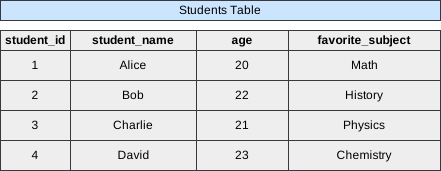 Image scaled to 65%
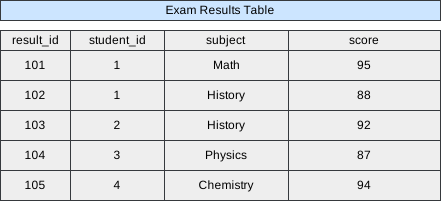 Image scaled to 65%
Query
SELECT student_name
FROM Students
WHERE student_id IN (
    SELECT student_id
    FROM Exam_Results
    WHERE score > 92
);
Database Exercise
Database Schema:
-- Database schema would be rendered hereExercise Script:
-- Exercise script would be rendered hereAvailable actions: Execute
Result
Executing the above query will fetch the names of students who scored more than 92 marks in any subject.
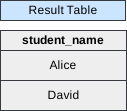 Image scaled to 22%
Usage of Nested Queries
-
WHERE Clause: To filter records from the main query by comparing them against the results of the subquery. For example, find employees whose salary is above the average salary:
SELECT Name, Salary FROM Employees WHERE Salary > (SELECT AVG(Salary) FROM Employees); -
SELECT Clause: Subqueries in the SELECT clause can provide details on each record. For instance, to find the total number of orders per customer:
SELECT Name, (SELECT COUNT(*) FROM Orders WHERE Orders.CustomerID = Customers.CustomerID) as OrderCount
FROM Customers;