Subqueries can be categorized based on where they appear in an SQL statement and their purpose. They are categorized as,
- Nested Scalar Subquery
- Single-Row Subquery
- Multiple-Row Subquery
- Single-Column Subquery
- Correlated Subquery
Example Data
The given table will be used for the demonstration of subtypes of nested queries.
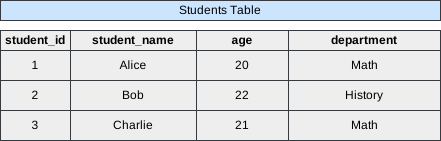 Image scaled to 65%
1. Nested Scalar Subquery
A Nested Scalar Subquery returns a single value and is often used in a comparison. In this example, we retrieve the student_name where the student_id is the maximum.
Query
SELECT student_name
FROM students
WHERE student_id = (SELECT MAX(student_id) FROM students);
Database Exercise
Database Schema:
-- Database schema would be rendered hereExercise Script:
-- Exercise script would be rendered hereAvailable actions: Execute
Result
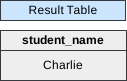 Image scaled to 23%
2. Single-Row Subquery
A Single-Row Subquery is used to fetch a specific row from the database table, in this case, retrieving the student_name and age where the student_id is the maximum in the students table.
Query
Database Exercise
Database Schema:
-- Database schema would be rendered hereExercise Script:
-- Exercise script would be rendered hereAvailable actions: Execute
Result
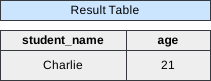 Image scaled to 35%
3. Multiple-Row Subquery
A Multiple-Row Subquery filters results based on a condition involving multiple rows. Here, we retrieve student_name for those in departments where at least one student is older than 21.
Query
Database Exercise
Database Schema:
-- Database schema would be rendered hereExercise Script:
-- Exercise script would be rendered hereAvailable actions: Execute
Result
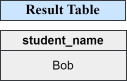 Image scaled to 23%
4. Single-Column Subquery
A Single-Column Subquery is used to extract a single column’s value from the database. In this example, we fetch the student_name where the student_id is less than the maximum.
Query
Database Exercise
Database Schema:
-- Database schema would be rendered hereExercise Script:
-- Exercise script would be rendered hereAvailable actions: Execute
Result
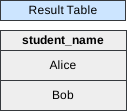 Image scaled to 23%
5. Correlated Subquery
A Correlated Subquery references columns from the outer query, creating a connection. Here, we fetch student_name for those whose age is greater than the average age in their respective departments.
Query
Database Exercise
Database Schema:
-- Database schema would be rendered hereExercise Script:
-- Exercise script would be rendered hereAvailable actions: Execute
Result
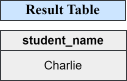 Image scaled to 23%