Problem
+-------------+---------+
| Column Name | Type    |
+-------------+---------+
| product_id  | int     |
| store_name1 | int     |
| store_name2 | int     |
|      :      | int     |
|      :      | int     |
|      :      | int     |
| store_namen | int     |
+-------------+---------+
product_id is the primary key for this table.
Each row in this table indicates the product's price in n different stores.
If the product is not available in a store, the price will be null in that store's column.
The names of the stores may change from one testcase to another. There will be at least 1 store and at most 30 stores.
Problem Definition
Implement the procedure UnpivotProducts to reorganize the Products table so that each row has the id of one product, the name of a store where it is sold, and its price in that store. If a product is not available in a store, do not include a row with that product_id and store combination in the result table. There should be three columns: product_id, store, and price.
The procedure should return the table after reorganizing it.
Return the result table in any order.
Example
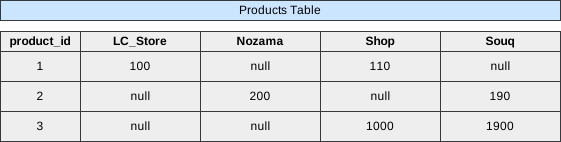 Image scaled to 80%
Output
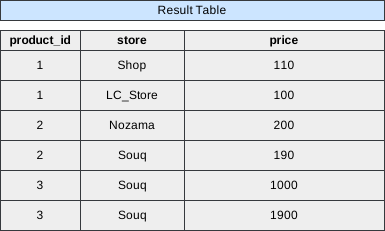 Image scaled to 65%
Solution
To transform the Products table from a wide format—where each store has its own column—to a long format—where each row represents a product’s price in a specific store—we implement the stored procedure UnpivotProducts. This procedure dynamically reorganizes the data, ensuring flexibility regardless of the number or names of stores involved. Below is a comprehensive breakdown of the approach, step-by-step execution, and detailed explanations for each component of the provided SQL query.
Approach Overview
-
Understand the Data Structure:
- Wide Format: The
Productstable has multiple columns for each store (store_name1,store_name2, …,store_namen), each representing the price of the product in that store. - Long Format: The desired output has three columns:
product_id,store, andprice, with each row representing a product’s price in a specific store.
- Wide Format: The
-
Identify Store Columns Dynamically:
- Since the number and names of stores can vary across different test cases (up to 30 stores), the procedure must dynamically identify all store columns in the
Productstable.
- Since the number and names of stores can vary across different test cases (up to 30 stores), the procedure must dynamically identify all store columns in the
-
Construct Dynamic SQL for Unpivoting:
- Use SQL string functions to build a dynamic
SELECTstatement that unpivots the data by converting each store column into separate rows.
- Use SQL string functions to build a dynamic
-
Execute the Dynamic SQL:
- Prepare and execute the dynamically constructed SQL statement to generate the final unpivoted table.
SQL Query
CREATE PROCEDURE UnpivotProducts()
BEGIN
	# Write your MySQL query statement below.
	set group_concat_max_len = 1000000;
	set @sql = null;
	with stores as (
	    SELECT COLUMN_NAME store
	    FROM INFORMATION_SCHEMA.COLUMNS
	    WHERE TABLE_NAME='products'
	      and COLUMN_NAME<>'product_id'
	)
	select group_concat(
	    concat(
	        'select product_id, "', store, '" ',
	        'as store, ', store, ' ',
	        'as price from products where ', store, ' is not null union'
	    )
	    order by store
	    separator ' '
	) into @sql
	from stores;

	/*select SUBSTRING(@sql, 1, LENGTH(@sql)-6);*/
	set @sql = SUBSTRING(@sql, 1, LENGTH(@sql)-6);
	prepare stmt from @sql;
	execute stmt;
END
Step-by-Step Explanation
Step 1: Increase GROUP_CONCAT Maximum Length
set group_concat_max_len = 1000000;- The
GROUP_CONCATfunction in MySQL has a default maximum length for the concatenated string it can produce. By settinggroup_concat_max_lento a large value (1,000,000 in this case), we ensure that the dynamic SQL string generated will not be truncated, even when dealing with numerous stores.
Step 2: Initialize the SQL Variable
set @sql = null;- Initializes the user-defined variable
@sqltoNULL. This variable will later store the dynamically constructed SQL statement.
Step 3: Retrieve Store Column Names
with stores as (
    SELECT COLUMN_NAME store
    FROM INFORMATION_SCHEMA.COLUMNS
    WHERE TABLE_NAME='products'
      and COLUMN_NAME<>'product_id'
)-
This Common Table Expression (CTE) named
storesretrieves all column names from theProductstable that represent stores. It excludes theproduct_idcolumn. -
Explanation:
INFORMATION_SCHEMA.COLUMNS: A system table that contains information about all columns in all tables within the database.TABLE_NAME='products': Filters the columns to only those belonging to theProductstable.COLUMN_NAME<>'product_id': Excludes theproduct_idcolumn since it’s not a store column.AS store: Aliases theCOLUMN_NAMEasstorefor clarity in subsequent steps.
-
Result:
- A list of store names corresponding to the columns in the
Productstable.
- A list of store names corresponding to the columns in the
Step 4: Dynamically Construct SELECT Statements for Each Store
select group_concat(
    concat(
        'select product_id, "', store, '" ',
        'as store, ', store, ' ',
        'as price from products where ', store, ' is not null union'
    )
    order by store
    separator ' '
) into @sql
from stores;-
It constructs a series of
SELECTstatements for each store, combining them usingUNIONto create a comprehensive query that unpivots the data. -
Breakdown:
-
concat(...): For each store, creates aSELECTstatement that retrieves theproduct_id, the store name asstore, and the correspondingprice. It includes aWHEREclause to filter outNULLprices, ensuring only available products are included.- Example for store
Shop:select product_id, "Shop" as store, Shop as price from products where Shop is not null union
- Example for store
-
group_concat(...): Aggregates all the constructedSELECTstatements into a single string, separated by spaces.order by store: Ensures that theSELECTstatements are ordered lexicographically based on store names.separator ' ': Specifies a space as the separator between concatenated strings.
-
into @sql: Stores the aggregatedSELECTstatements into the@sqlvariable for later execution.
-
-
Example Output for the Given Stores (
LC_Store,Nozama,Shop,Souq):select product_id, "LC_Store" as store, LC_Store as price from products where LC_Store is not null union select product_id, "Nozama" as store, Nozama as price from products where Nozama is not null union select product_id, "Shop" as store, Shop as price from products where Shop is not null union select product_id, "Souq" as store, Souq as price from products where Souq is not null union
Step 5: Remove the Trailing ‘UNION’
/*select SUBSTRING(@sql, 1, LENGTH(@sql)-6);*/
set @sql = SUBSTRING(@sql, 1, LENGTH(@sql)-6);-
Explanation:
SUBSTRING(@sql, 1, LENGTH(@sql)-6):LENGTH(@sql): Calculates the total length of the concatenated string.-6: Removes the last 6 characters (' union').SUBSTRING: Extracts the substring from the first character up to the length minus 6, effectively trimming the trailing' union'.
-
Result:
- A properly formatted SQL statement without the trailing
' union', ready for execution.
- A properly formatted SQL statement without the trailing
-
Final Dynamic SQL Example:
select product_id, "LC_Store" as store, LC_Store as price from products where LC_Store is not null union
select product_id, "Nozama" as store, Nozama as price from products where Nozama is not null union
select product_id, "Shop" as store, Shop as price from products where Shop is not null union
select product_id, "Souq" as store, Souq as price from products where Souq is not null
Step 6: Prepare and Execute the Dynamic SQL Statement
prepare stmt from @sql;
execute stmt;-
Explanation:
PREPARE stmt FROM @sql;: Takes the dynamic SQL stored in@sqland prepares it as a statement namedstmt.EXECUTE stmt;: Runs the prepared statement, generating the unpivoted result set.
-
Final Output:
Executing the prepared dynamic SQL will produce a table in the desired long format. For example:
+------------+----------+-------+ | product_id | store | price | +------------+----------+-------+ | 1 | LC_Store | 100 | | 1 | Shop | 110 | | 1 | Souq | 5000 | | 2 | Nozama | 200 | | 2 | Souq | 190 | | 3 | Shop | 1000 | | 3 | Souq | 1900 | +------------+----------+-------+- Interpretation:
- Each
product_idappears multiple times, once for each store where it is sold. - The
pricecolumn reflects the product’s price in the respective store. - Rows where the product is not sold in a store are excluded, as per the
WHERE store IS NOT NULLcondition in the dynamic SQL.
- Each
- Interpretation: