Problem
Table: Products
+-------------+---------+
| Column Name | Type    |
+-------------+---------+
| product_id  | int     |
| store       | varchar |
| price       | int     |
+-------------+---------+
(product_id, store) is the primary key (combination of columns with unique values) for this table.
Each row of this table indicates the price of product_id in store.
There will be at most 30 different stores in the table.
price is the price of the product at this store.
Problem Definition
Implement the procedure PivotProducts to reorganize the Products table so that each row has the id of one product and its price in each store. The price should be null if the product is not sold in a store. The columns of the table should contain each store and they should be sorted in lexicographical order.
The procedure should return the table after reorganizing it.
Return the result table in any order.
Example
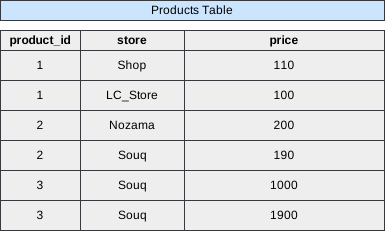 Image scaled to 60%
Output
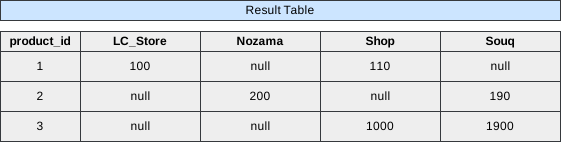 Image scaled to 80%
Solution
To transform the Products table into a pivoted format where each row represents a unique product_id with its corresponding prices across various stores, we need to dynamically generate SQL statements. This is essential because the number of stores can vary, and SQL doesn’t inherently support dynamic column generation in static queries. The provided stored procedure PivotProducts accomplishes this using dynamic SQL, window functions, and conditional aggregation. Below is a comprehensive breakdown of the approach, step-by-step execution, and detailed explanations for each component of the SQL query.
Approach Overview
-
Understand the Data Structure:
- Each row in the
Productstable represents the price of a specific product in a particular store. - The combination of
(product_id, store)is unique, ensuring that each product-store pair appears only once.
- Each row in the
-
Identify Unique Stores:
- Since the number of stores can vary (up to 30 as per the problem statement), we need a dynamic way to handle each store as a separate column in the pivoted result.
-
Construct Dynamic SQL for Pivoting:
- Use
GROUP_CONCATto dynamically generate the SQL segments required for each store. - Aggregate the prices using conditional logic to place them under their respective store columns.
- Use
-
Execute the Dynamic SQL:
- Prepare, execute, and deallocate the dynamically constructed SQL statement to produce the final pivoted table.
SQL Query
CREATE PROCEDURE PivotProducts()
BEGIN
	# Write your MySQL query statement below.
    SET group_concat_max_len = 1000000; #This is tricky. There's a length limit on GROUP_CONCAT.
    SET @sql = NULL;
    SELECT
    GROUP_CONCAT(DISTINCT CONCAT(
      'SUM(IF(store = "', store, '", price, null)) AS ', store) ORDER BY store ASC)
    INTO @sql
    FROM Products;

    SET @sql = CONCAT('SELECT product_id, ', @sql, ' FROM Products GROUP BY product_id');


    PREPARE stmt FROM @sql;
    EXECUTE stmt;
    DEALLOCATE PREPARE stmt;
END
Step-by-Step Explanation
Step 1: Increase GROUP_CONCAT Maximum Length
SET group_concat_max_len = 1000000; #This is tricky. There's a length limit on GROUP_CONCAT.- The
GROUP_CONCATfunction in MySQL has a default maximum length for the concatenated string it can produce. By settinggroup_concat_max_lento a large value (1,000,000 in this case), we ensure that the dynamic SQL string generated will not be truncated, especially when dealing with numerous stores.
Step 2: Initialize the Dynamic SQL Variable
SET @sql = NULL;- Initializes the user-defined variable
@sqltoNULL. This variable will later store the dynamically constructed SQL statement.
Step 3: Dynamically Generate the SELECT Clause for Each Store
SELECT
GROUP_CONCAT(DISTINCT CONCAT(
  'SUM(IF(store = "', store, '", price, null)) AS ', store) ORDER BY store ASC)
INTO @sql
FROM Products;-
Purpose:
GROUP_CONCAT: Aggregates the generated SQL segments for each store into a single comma-separated string.DISTINCT: Ensures that each store is processed only once, eliminating duplicates.CONCAT: Constructs the SQL expression for each store.
-
Breakdown of the
CONCATFunction:'SUM(IF(store = "', store, '", price, null)) AS ', store:IF(store = "StoreName", price, null): Checks if the current row’sstorematches the store being processed. If it does, it returns theprice; otherwise, it returnsnull.SUM(IF(...)): Aggregates the prices for each store. Since each(product_id, store)pair is unique, theSUMeffectively retrieves thepriceif the store matches, ornullotherwise.AS StoreName: Aliases the resulting sum as the store’s name, creating a column with the store’s name in the final result.
-
ORDER BY store ASC:
Ensures that the store columns are ordered lexicographically (alphabetically) as required. -
Result of
GROUP_CONCAT:
Generates a string like:SUM(IF(store = "LC_Store", price, null)) AS LC_Store, SUM(IF(store = "Nozama", price, null)) AS Nozama, SUM(IF(store = "Shop", price, null)) AS Shop, SUM(IF(store = "Souq", price, null)) AS Souq -
INTO @sql:
Stores the concatenated string into the@sqlvariable for later use.
Step 4: Construct the Final Dynamic SQL Statement
SET @sql = CONCAT('SELECT product_id, ', @sql, ' FROM Products GROUP BY product_id');-
Purpose:
CONCAT: Combines static and dynamic parts of the SQL query.'SELECT product_id, ': Begins the SELECT statement by selectingproduct_id.@sql: Inserts the dynamically generated SUM statements for each store.' FROM Products GROUP BY product_id': Specifies the data source and groups the results byproduct_id.
-
Resulting Dynamic SQL Statement (
@sql):SELECT product_id, SUM(IF(store = "LC_Store", price, null)) AS LC_Store, SUM(IF(store = "Nozama", price, null)) AS Nozama, SUM(IF(store = "Shop", price, null)) AS Shop, SUM(IF(store = "Souq", price, null)) AS Souq FROM Products GROUP BY product_id -
This dynamic SQL statement effectively pivots the
Productstable, turning unique store names into individual columns with their corresponding prices. If a product isn’t sold in a particular store, theSUM(IF(...))expression will returnnullfor that store’s column.
Step 5: Prepare and Execute the Dynamic SQL Statement
PREPARE stmt FROM @sql;
EXECUTE stmt;
DEALLOCATE PREPARE stmt;-
PREPARE stmt FROM @sql;- Prepares the dynamically constructed SQL statement stored in
@sqlfor execution.
- Prepares the dynamically constructed SQL statement stored in
-
EXECUTE stmt;- Executes the prepared statement
stmt.
- Executes the prepared statement
-
DEALLOCATE PREPARE stmt;- Frees the resources associated with the prepared statement
stmt.
- Frees the resources associated with the prepared statement
Final Pivoted Output
Executing the stored procedure PivotProducts() will produce a result set similar to the following, depending on the data in the Products table:
+------------+-----------+-------+-------+-------+
| product_id | LC_Store  | Nozama| Shop  | Souq  |
+------------+-----------+-------+-------+-------+
| 1          | 100       | NULL  | 110   | NULL  |
| 2          | NULL      | 200   | NULL  | 190   |
| 3          | NULL      | NULL  | 1000  | 1900  |
+------------+-----------+-------+-------+-------+-
Interpretation:
-
product_id = 1:- LC_Store: $100
- Shop: $110
- Nozama & Souq: Not available (
NULL)
-
product_id = 2:- Nozama: $200
- Souq: $190
- LC_Store & Shop: Not available (
NULL)
-
product_id = 3:- Shop: $1000
- Souq: $1900
- LC_Store & Nozama: Not available (
NULL)
-
product_id = 4:- Shop: $200
- Souq: $300
- LC_Store & Nozama: Not available (
NULL)
-
-
Note:
If a product is not sold in a particular store, the corresponding column will displayNULLas required.