Problem
Table: Accounts
+---------------+---------+
| Column Name   | Type    |
+---------------+---------+
| id            | int     |
| name          | varchar |
+---------------+---------+
id is the primary key (column with unique values) for this table.
This table contains the account id and the user name of each account.
Table: Logins
+---------------+---------+
| Column Name   | Type    |
+---------------+---------+
| id            | int     |
| login_date    | date    |
+---------------+---------+
This table may contain duplicate rows.
This table contains the account id of the user who logged in and the login date. A user may log in multiple times in the day.
Problem Definition
Active users are those who logged in to their accounts for five or more consecutive days.
Write a solution to find the id and the name of active users.
Return the result table ordered by id.
Example
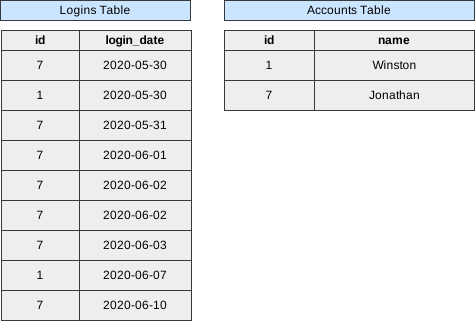 Image scaled to 80%
Output
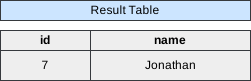 Image scaled to 40%
Try It Yourself
Database Exercise
Database Schema:
-- Database schema would be rendered hereExercise Script:
-- Exercise script would be rendered hereAvailable actions: Execute
Solution
To identify active users who have logged in for five or more consecutive days, the SQL solution employs a self-join and aggregation. The SELECT clause retrieves distinct account IDs (l1.id) and uses a subquery to fetch the corresponding names from the “Accounts” table. The FROM clause specifies the “Logins” table with aliases (l1 and l2) for the self-join.
The self-join is established in the JOIN clause, connecting rows where the account IDs are the same (l1.id = l2.id) and the login dates have a difference between 1 and 4 days (DATEDIFF(l2.login_date, l1.login_date) BETWEEN 1 AND 4). This ensures that the login dates are consecutive.
The GROUP BY clause is used to group the results by account ID (l1.id) and login date (l1.login_date). The HAVING clause filters the groups to include only those where the count of distinct login dates (COUNT(DISTINCT l2.login_date)) is equal to 4, indicating five or more consecutive logins.
SELECT DISTINCT l1.id,
                (SELECT NAME
                 FROM   accounts
                 WHERE  id = l1.id) AS NAME
FROM   logins l1
       JOIN logins l2
         ON l1.id = l2.id
            AND Datediff(l2.login_date, l1.login_date) BETWEEN 1 AND 4
GROUP  BY l1.id,
          l1.login_date
HAVING Count(DISTINCT l2.login_date) = 4
Let’s break down the query step by step:
Step 1: Identify consecutive logins within a 4-day window
We use a self-join on the Logins table (l1 and l2) to find consecutive logins for each user where the login dates are within a 4-day window.
SELECT l1.id,
                (SELECT NAME
                 FROM   Accounts
                 WHERE  id = l1.id) AS NAME
FROM   Logins l1
       JOIN Logins l2
         ON l1.id = l2.id
            AND Datediff(l2.login_date, l1.login_date) BETWEEN 1 AND 4;
Output After Step 1:
+----+----------+
| id | name     |
+----+----------+
| 7  | Jonathan |
| 7  | Jonathan |
| 7  | Jonathan |
| 7  | Jonathan |
| 7  | Jonathan |
| 7  | Jonathan |
| 7  | Jonathan |
| 7  | Jonathan |
| 7  | Jonathan |
| 7  | Jonathan |
| 7  | Jonathan |
| 7  | Jonathan |
| 7  | Jonathan |
| 7  | Jonathan |
+----+----------+
Step 2: Group by user and login date, filter for users with consecutive logins on 4 different days
We group the results from Step 1 by user and login date and filter out users who don’t have logins on 4 different days.
SELECT l1.id,
       (SELECT NAME
        FROM   Accounts
        WHERE  id = l1.id) AS NAME,
       l1.login_date
FROM   Logins l1
       JOIN Logins l2
         ON l1.id = l2.id
            AND Datediff(l2.login_date, l1.login_date) BETWEEN 1 AND 4
GROUP  BY l1.id,
          l1.login_date
HAVING Count(DISTINCT l2.login_date) = 4;
Output After Step 2:
+----+----------+
| id | name     |
+----+----------+
| 7  | Jonathan |
+----+----------+
Step 3: Get unique active users
We use DISTINCT to get unique active users from the filtered result.
SELECT DISTINCT id, NAME
FROM (
    SELECT l1.id,
           (SELECT NAME
            FROM   Accounts
            WHERE  id = l1.id) AS NAME,
           l1.login_date
    FROM   Logins l1
           JOIN Logins l2
             ON l1.id = l2.id
                AND Datediff(l2.login_date, l1.login_date) BETWEEN 1 AND 4
    GROUP  BY l1.id,
              l1.login_date
    HAVING Count(DISTINCT l2.login_date) = 4
) active_users;
Final Output:
+----+----------+
| id | name     |
+----+----------+
| 7  | Jonathan |
+----+----------+