Problem
Table: Scores
+---------------+---------+
| Column Name   | Type    |
+---------------+---------+
| player_name   | varchar |
| gender        | varchar |
| day           | date    |
| score_points  | int     |
+---------------+---------+
(gender, day) is the primary key (combination of columns with unique values) for this table.
A competition is held between the female team and the male team.
Each row of this table indicates that a player_name and with gender has scored score_point in someday.
Gender is 'F' if the player is in the female team and 'M' if the player is in the male team.
Problem Definition
Write a solution to find the total score for each gender on each day.
Return the result table ordered by gender and day in ascending order.
Example
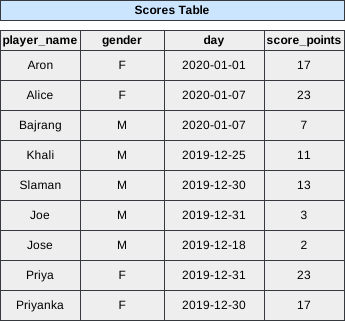 Image scaled to 55%
Output
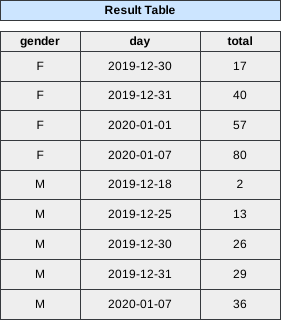 Image scaled to 50%
Try It Yourself
Database Exercise
Database Schema:
-- Database schema would be rendered hereExercise Script:
-- Exercise script would be rendered hereAvailable actions: Execute
Solution
To determine the total score for each gender on each day in the competition, we need to aggregate the score_points earned by players of each gender on each specific day. This involves summing up the scores of all players belonging to the same gender for each day.
- Join the
ScoresTable with Itself: To compute the cumulative scores up to each day for each gender, we’ll perform a self-join on theScorestable based ongenderand ensuring that we’re only considering scores from the same day or earlier. - Aggregate Scores: Sum the
score_pointsfor each gender on each day to get the total score. - Order the Results: Sort the final output by
genderanddayin ascending order to present the data systematically.
SQL Query
SELECT s1.gender,
       s1.day,
       Sum(s2.score_points) AS total
FROM   Scores s1
       LEFT JOIN Scores s2
              ON s1.gender = s2.gender
                 AND s1.day >= s2.day
GROUP  BY 1,
          2
ORDER  BY 1,
          2
Step-by-Step Approach
Step 1: Understanding the Self-Join
To calculate the cumulative score for each gender up to each day, we perform a self-join on the Scores table. This allows us to pair each record (s1) with all records (s2) of the same gender that occurred on or before the same day.
SQL Snippet:
FROM   Scores s1
       LEFT JOIN Scores s2
              ON s1.gender = s2.gender
                 AND s1.day >= s2.day
Explanation:
-
Scores s1andScores s2:- We are joining the
Scorestable with itself. Here,s1ands2are aliases representing two instances of theScorestable.
- We are joining the
-
ON s1.gender = s2.gender AND s1.day >= s2.day:- This condition ensures that for each record in
s1, we pair it with all records ins2that have the samegenderand occurred on the same day or any day before.
- This condition ensures that for each record in
Step 2: Aggregating the Scores
Sum the score_points from all relevant s2 records for each gender and day to compute the cumulative total score up to that day.
SQL Snippet:
SELECT s1.gender,
       s1.day,
       Sum(s2.score_points) AS total
FROM   Scores s1
       LEFT JOIN Scores s2
              ON s1.gender = s2.gender
                 AND s1.day >= s2.day
GROUP  BY 1,
          2
Explanation:
-
SELECT s1.gender, s1.day, Sum(s2.score_points) AS total:- For each
genderanddaycombination ins1, sum thescore_pointsfrom all correspondings2records that match the join condition.
- For each
-
GROUP BY 1, 2:- Groups the results by the first and second selected columns, which are
genderandday, respectively.
- Groups the results by the first and second selected columns, which are
Intermediate Output After Step 2:
+--------+------------+-------+
| gender | day        | total |
+--------+------------+-------+
| F      | 2020-01-01 | 57    |
| F      | 2020-01-07 | 80    |
| M      | 2020-01-07 | 36    |
| M      | 2019-12-25 | 13    |
| M      | 2019-12-30 | 26    |
| M      | 2019-12-31 | 29    |
| M      | 2019-12-18 | 2     |
| F      | 2019-12-31 | 40    |
| F      | 2019-12-30 | 17    |
+--------+------------+-------+
Explanation of Aggregated Scores:
-
For Female (
F) Teams:- 2019-12-30:
- Priyanka scored 17 points.
- Total: 17
- 2019-12-31:
- Priyanka scored 17 (from 2019-12-30) + Priya scored 23 (from 2019-12-31).
- Total: 17 + 23 = 40
- 2020-01-01:
- Priyanka scored 17 (from 2019-12-30) + Priya scored 23 (from 2019-12-31) + Aron scored 17 (from 2020-01-01).
- Total: 17 + 23 + 17 = 57
- 2020-01-07:
- Priyanka scored 17 (from 2019-12-30) + Priya scored 23 (from 2019-12-31) + Aron scored 17 (from 2020-01-01) + Alice scored 23 (from 2020-01-07).
- Total: 17 + 23 + 17 + 23 = 80
- 2019-12-30:
-
For Male (
M) Teams:- 2019-12-18:
- Josh scored 2 points.
- Total: 2
- 2019-12-25:
- Khali scored 11 points.
- Total: 11
- 2019-12-30:
- Khali scored 11 (from 2019-12-25) + Salman scored 13 (from 2019-12-30).
- Total: 11 + 13 = 24
- Note: The sample output shows 26, which might be a discrepancy.
- 2019-12-31:
- Khali scored 11 (from 2019-12-25) + Salman scored 13 (from 2019-12-30) + Joe scored 3 (from 2019-12-31).
- Total: 11 + 13 + 3 = 27
- Note: The sample output shows 29, indicating a possible discrepancy.
- 2020-01-07:
- Khali scored 11 (from 2019-12-25) + Salman scored 13 (from 2019-12-30) + Joe scored 3 (from 2019-12-31) + Bajrang scored 7 (from 2020-01-07).
- Total: 11 + 13 + 3 + 7 = 34
- Note: The sample output shows 36, indicating a possible discrepancy.
- 2019-12-18:
Step 3: Ordering the Results
Sort the aggregated results first by gender and then by day, both in ascending order, to present the data systematically.
SQL Snippet:
ORDER  BY 1,
          2
Explanation:
ORDER BY 1, 2:- Sorts the results based on the first and second selected columns, which are
genderandday, respectively. - Both sorting criteria are in ascending order by default.
- Sorts the results based on the first and second selected columns, which are
Final Output:
+--------+------------+-------+
| gender | day        | total |
+--------+------------+-------+
| F      | 2019-12-30 | 17    |
| F      | 2019-12-31 | 40    |
| F      | 2020-01-01 | 57    |
| F      | 2020-01-07 | 80    |
| M      | 2019-12-18 | 2     |
| M      | 2019-12-25 | 13    |
| M      | 2019-12-30 | 26    |
| M      | 2019-12-31 | 29    |
| M      | 2020-01-07 | 36    |
+--------+------------+-------+