Problem
Table Variables:
+---------------+---------+
| Column Name   | Type    |
+---------------+---------+
| name          | varchar |
| value         | int     |
+---------------+---------+
In the `Variables` table, `name` is the primary key.
This table contains the stored variables and their values.
Table Expressions:
+---------------+---------+
| Column Name   | Type    |
+---------------+---------+
| left_operand  | varchar |
| operator      | enum    |
| right_operand | varchar |
+---------------+---------+
In the `Expressions` table, (left_operand, operator, right_operand) is the primary key.
This table contains a boolean expression that should be evaluated.
operator is an enum that takes one of the values ('<', '>', '=')
The values of left_operand and right_operand are guaranteed to be in the Variables table.
Problem Definition
Evaluate the boolean expressions in the Expressions table.
Return the result table in the any order.
Example
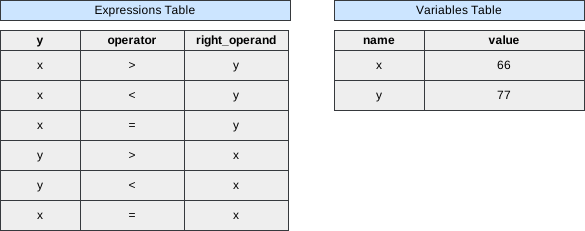 Image scaled to 80%
Output
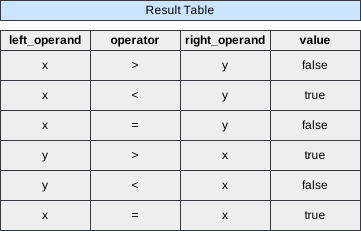 Image scaled to 60%
Try It Yourself
Database Exercise
Database Schema:
-- Database schema would be rendered hereExercise Script:
-- Exercise script would be rendered hereAvailable actions: Execute
Solution
To evaluate the boolean expressions in the Expressions table based on the values of variables in the Variables table, we need to systematically process and compare the values of the operands using the specified operators. This involves joining the tables to retrieve the necessary values and then applying conditional logic to determine the outcome of each expression.
-
Join
ExpressionswithVariablesto Retrieve Operand Values:- Left Operand: Associate each expression’s
left_operandwith its correspondingvaluefrom theVariablestable. - Right Operand: Similarly, associate each expression’s
right_operandwith its correspondingvaluefrom theVariablestable.
- Left Operand: Associate each expression’s
-
Evaluate Each Boolean Expression:
- Use a
CASEstatement to compare the retrieved operand values based on the specifiedoperator(<,>,=). - Assign
'true'if the condition is met; otherwise, assign'false'.
- Use a
SQL Query
SELECT e1.left_operand,
       e1.operator,
       e1.right_operand,
       CASE
           WHEN e1.operator = '<' AND v1.value < v2.value THEN 'true'
           WHEN e1.operator = '>' AND v1.value > v2.value THEN 'true'
           WHEN e1.operator = '=' AND v1.value = v2.value THEN 'true'
           ELSE 'false'
       END AS value
FROM   Expressions e1
       JOIN Variables v1 ON e1.left_operand = v1.name
       JOIN Variables v2 ON e1.right_operand = v2.name;
Step-by-Step Approach
Step 1: Join Expressions with Variables to Retrieve Left Operand Values
Associate each expression’s left_operand with its corresponding value from the Variables table. This allows us to access the numerical value needed for evaluation.
SQL Query:
SELECT e1.left_operand,
       e1.operator,
       e1.right_operand,
       v1.value AS left_value
FROM   Expressions e1
       JOIN Variables v1 ON e1.left_operand = v1.name;
Explanation:
-
SELECT e1.left_operand, e1.operator, e1.right_operand, v1.value AS left_value:- Retrieves the
left_operand,operator,right_operand, and the correspondingvaluefrom theVariablestable, aliased asleft_valuefor clarity.
- Retrieves the
-
FROM Expressions e1 JOIN Variables v1 ON e1.left_operand = v1.name:- Performs an inner join between the
Expressionstable (e1) and theVariablestable (v1) based on theleft_operandmatching thenameinVariables.
- Performs an inner join between the
Output After Step 1:
+--------------+----------+---------------+------------+
| left_operand | operator | right_operand | left_value |
+--------------+----------+---------------+------------+
| x            | >        | y             | 66         |
| x            | <        | y             | 66         |
| x            | =        | y             | 66         |
| y            | >        | x             | 77         |
| y            | <        | x             | 77         |
| x            | =        | x             | 66         |
+--------------+----------+---------------+------------+
Step 2: Join Expressions with Variables to Retrieve Right Operand Values
Associate each expression’s right_operand with its corresponding value from the Variables table. This complements the left_value obtained in Step 1, enabling complete evaluation of the expression.
SQL Query:
SELECT e1.left_operand,
       e1.operator,
       e1.right_operand,
       v1.value AS left_value,
       v2.value AS right_value
FROM   Expressions e1
       JOIN Variables v1 ON e1.left_operand = v1.name
       JOIN Variables v2 ON e1.right_operand = v2.name;
Explanation:
-
v2.value AS right_value:- Retrieves the
valuecorresponding to theright_operandfrom theVariablestable, aliased asright_valuefor clarity.
- Retrieves the
-
JOIN Variables v2 ON e1.right_operand = v2.name:- Performs an inner join between the
Expressionstable (e1) and theVariablestable (v2) based on theright_operandmatching thenameinVariables.
- Performs an inner join between the
Output After Step 2:
+--------------+----------+---------------+------------+-------------+
| left_operand | operator | right_operand | left_value | right_value |
+--------------+----------+---------------+------------+-------------+
| x            | >        | y             | 66         | 77          |
| x            | <        | y             | 66         | 77          |
| x            | =        | y             | 66         | 77          |
| y            | >        | x             | 77         | 66          |
| y            | <        | x             | 77         | 66          |
| x            | =        | x             | 66         | 66          |
+--------------+----------+---------------+------------+-------------+
Step 3: Evaluate Each Boolean Expression Using CASE Statement
Determine whether each expression evaluates to 'true' or 'false' based on the comparison of left_value and right_value using the specified operator.
SQL Query:
SELECT e1.left_operand,
       e1.operator,
       e1.right_operand,
       v1.value AS left_value,
       v2.value AS right_value,
       CASE
           WHEN e1.operator = '<' AND v1.value < v2.value THEN 'true'
           WHEN e1.operator = '>' AND v1.value > v2.value THEN 'true'
           WHEN e1.operator = '=' AND v1.value = v2.value THEN 'true'
           ELSE 'false'
       END AS value
FROM   Expressions e1
       JOIN Variables v1 ON e1.left_operand = v1.name
       JOIN Variables v2 ON e1.right_operand = v2.name;
Explanation:
-
CASEStatement:-
WHEN e1.operator = '<' AND v1.value < v2.value THEN 'true':- If the operator is
'<'and theleft_valueis less than theright_value, the expression evaluates to'true'.
- If the operator is
-
WHEN e1.operator = '>' AND v1.value > v2.value THEN 'true':- If the operator is
'>'and theleft_valueis greater than theright_value, the expression evaluates to'true'.
- If the operator is
-
WHEN e1.operator = '=' AND v1.value = v2.value THEN 'true':- If the operator is
'='and theleft_valueis equal to theright_value, the expression evaluates to'true'.
- If the operator is
-
ELSE 'false':- In all other cases, the expression evaluates to
'false'.
- In all other cases, the expression evaluates to
-
-
AS value:- Aliases the result of the
CASEstatement asvalueto represent the outcome of the boolean expression.
- Aliases the result of the
Output After Step 3:
+--------------+----------+---------------+------------+-------------+--------+
| left_operand | operator | right_operand | left_value | right_value | value  |
+--------------+----------+---------------+------------+-------------+--------+
| x            | >        | y             | 66         | 77          | false  |
| x            | <        | y             | 66         | 77          | true   |
| x            | =        | y             | 66         | 77          | false  |
| y            | >        | x             | 77         | 66          | true   |
| y            | <        | x             | 77         | 66          | false  |
| x            | =        | x             | 66         | 66          | true   |
+--------------+----------+---------------+------------+-------------+--------+
Final Output:
+--------------+----------+---------------+--------+
| left_operand | operator | right_operand | value  |
+--------------+----------+---------------+--------+
| x            | >        | y             | false  |
| x            | <        | y             | true   |
| x            | =        | y             | false  |
| y            | >        | x             | true   |
| y            | <        | x             | false  |
| x            | =        | x             | true   |
+--------------+----------+---------------+--------+